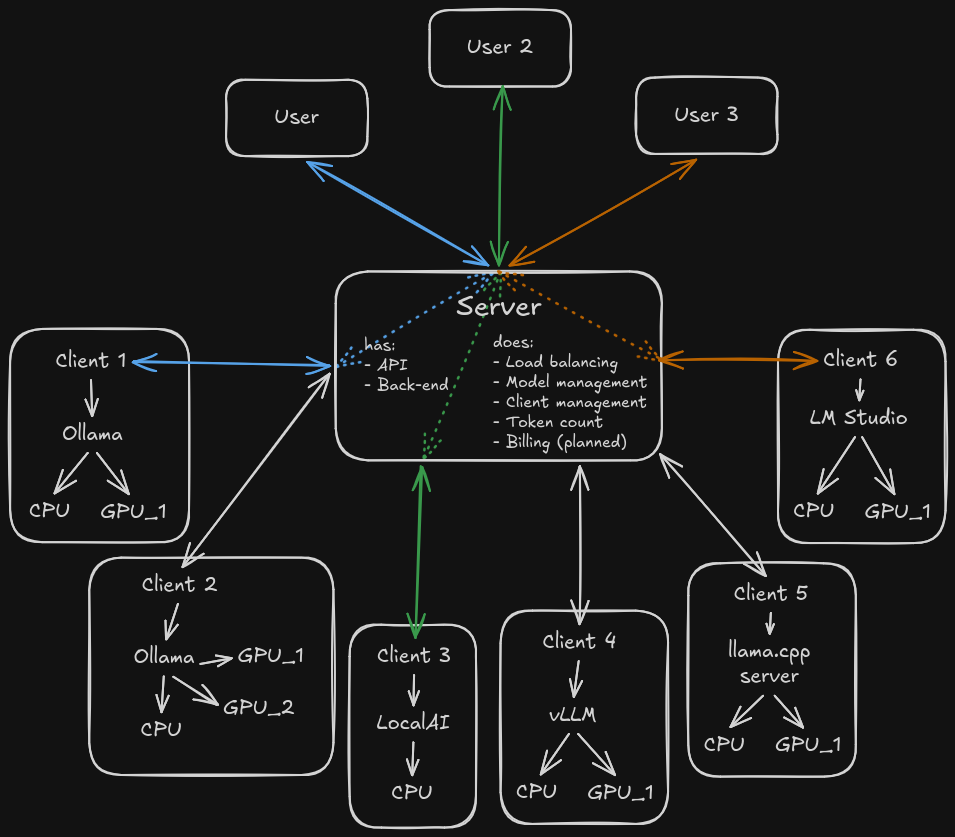
# Ngino Ngino is a small outbound HTTP tunnel for running Ollama (or vLLM, etc.) on GPU workstations while exposing the API from a server that cannot reach those workstations directly. The client opens and maintains a WebSocket connection to the server. The server accepts normal HTTP requests and forwards them through that WebSocket to the client. The client then calls a local upstream such as `http://localhost:11434` and streams the response back.
client-server architecture visualized using arrows The server provides - An API with - Authentication via user keys - Authorization (planned) - Load balancing (Scale your AI strategy horizontally!) - (Ollama-only) Model management (install, remove, load, unload models) - Client monitoring - Who is active - What models are running - How many requests is each client processing - How many requests has each client processed - Group management (planned) - Who can access which models - What clients are mapped to which groups - Billing (planned) - (planned) Price per model per thousand tokens - (planned) Usage per user key - (planned) Rate limiting The client provides a persistent outbound connection to the server and forwards requests to the local Ollama (or vLLM, etc.) instance. Responses stream back through the tunnel with minimal overhead.
[Screenshots of the app can be seen here](docs/Screenshots.md) ## Projects - `src/Ngino.Server`: ASP.NET Core server. Exposes the public proxy endpoint and accepts the outbound client tunnel. - `src/Ngino.Client`: Console client. Runs on the GPU machine and forwards requests to local Ollama. - `src/Ngino.Protocol`: Shared tunnel message types. ## Run Start the server: ```powershell dotnet run --project src/Ngino.Server --urls http://0.0.0.0:5050 -- --token "change-me" ``` Start the client on the GPU workstation: ```powershell dotnet run --project src/Ngino.Client -- --server http://your-server:5050 --upstream http://localhost:11434 --token "change-me" ``` Call Ollama through the server. Model-bearing requests on the root path are routed to a connected client that reports that model, preferring the client with the fewest in-flight requests. You can still address one client explicitly by id: ```powershell curl.exe -H "X-Ngino-Token: change-me" http://your-server:5050/api/tags curl.exe -H "X-Ngino-Token: change-me" http://your-server:5050/clients/gpu-01/api/tags curl.exe http://your-server:5050/token/change-me/api/tags curl.exe http://your-server:5050/token/change-me/clients/gpu-01/api/tags ``` ```powershell curl.exe -H "X-Ngino-Token: change-me" ` -H "Content-Type: application/json" ` -d '{"model":"llama3.1","prompt":"hello"}' ` http://your-server:5050/api/generate ``` ## Configuration Server options: - `--token ` or `REVERSE_LLAMA_TOKEN`: optional shared token. If set, proxy calls must authenticate with `X-Ngino-Token`, `Authorization: Bearer `, or the `/token//...` path prefix. - `--tunnel-path `: defaults to `/_ngino/tunnel`. - `--status-path `: defaults to `/_ngino/status`. - `--chunk-size ` or `REVERSE_LLAMA_CHUNK_SIZE`: defaults to `65536`. - `--embedding-cache-path ` or `REVERSE_LLAMA_EMBEDDING_CACHE_PATH`: SQLite cache file for embedding vectors. Defaults to `App_Data\embedding-cache.sqlite` under the server app directory. - `--management-database-path ` or `REVERSE_LLAMA_MANAGEMENT_DATABASE_PATH`: SQLite database for admin user keys, client keys, client disable state, and request/model metrics. Defaults to `App_Data\management.sqlite` under the server app directory. - `--secure-cookies` or `REVERSE_LLAMA_SECURE_COOKIES`: set to `false` to allow admin auth cookies over plain HTTP (for local development). Defaults to `true`. Admin UI: - `GET /admin` opens the Keycloak-protected management UI. - The temporary Keycloak settings live under `Authentication:Keycloak` in `appsettings.json`. - User keys created in the UI are accepted anywhere the shared token is accepted: `X-Ngino-Token`, `Authorization: Bearer `, `?token=...`, and `/token//...`. - Model add/remove/load/unload commands are sent through the connected tunnel client to Ollama (`/api/pull`, `/api/delete`, `/api/generate`, and `/api/show`). Client options: - `--server ` or `REVERSE_LLAMA_SERVER`: server base URL, for example `http://your-server:5050`. - `--upstream ` or `REVERSE_LLAMA_UPSTREAM`: local Ollama URL, defaults to `http://localhost:11434`. - `--token ` or `REVERSE_LLAMA_TOKEN`: optional shared token. - `--client-id ` or `REVERSE_LLAMA_CLIENT_ID`: identifies this machine on the server; defaults to the machine name. - `--tunnel-path ` or `REVERSE_LLAMA_TUNNEL_PATH`: defaults to `/_ngino/tunnel`. - `--reconnect-delay ` or `REVERSE_LLAMA_RECONNECT_DELAY_SECONDS`: defaults to `5`. - `--chunk-size ` or `REVERSE_LLAMA_CHUNK_SIZE`: defaults to `65536`. The token is accepted as `X-Ngino-Token`, as `Authorization: Bearer `, or as a path prefix like `/token//api/tags` or `/token//clients/{id}/v1`. The Bearer form lets OpenAI-compatible clients (e.g. n8n's OpenAI nodes pointed at `/clients/{id}/v1`) authenticate with their API-key field. The path-token form is useful for clients that cannot send custom headers. The server strips its own token header/Bearer value and removes the path prefix before forwarding; any other `Authorization` value is forwarded untouched. ## Multiple clients Any number of machines can connect at the same time; each registers under its client id (machine name by default). - `GET/POST /clients/{client-id}/...` forwards to that specific machine. - The client reports its local Ollama model list from `/api/tags` when it connects and refreshes it every minute. - The plain root path (`/api/...`, `/v1/...`) routes model-bearing requests to a client that reports the requested model, preferring the lowest in-flight request count. Requests without a model are sent to the connected client with the fewest in-flight requests. - The status endpoint lists all connected clients, their in-flight request counts, and their last reported model lists. - If a client connects with an id that is already in use, the old connection is replaced and the replaced client exits instead of reconnecting. ## Embedding cache The server keeps an in-memory KV cache for embedding vectors and persists it to SQLite. The cache key is the requested `model` plus the exact input text. It applies to `POST /api/embed`, `POST /api/embeddings`, and `POST /v1/embeddings`; cache hits return JSON in the same endpoint family shape and include `X-Ngino-Embedding-Cache: hit`. The authenticated status endpoint reports whether the cache is available, plus the cache count and database path. If SQLite cannot be initialized, proxy traffic continues without embedding-cache writes. ## Client installer Linux: ```bash sudo bash deploy/install-client.sh --server http://your-server:5050 --token "change-me" ``` Options: `--server`, `--token` (required); `--client-id`, `--upstream`, `--install-dir`, `--service-name`, `--no-ollama` (optional). Missing required values are prompted interactively. The script ensures .NET 10 and Ollama are installed, builds the client self-contained, installs it to `/opt/Ngino-client`, and creates a systemd service (`Ngino-client`). Logs: `journalctl -u Ngino-client -f`. ## Notes - Request and response bodies are streamed through the tunnel, which is important for Ollama streaming responses. ## Security notes - Use HTTPS or a private network/VPN when exposing this outside a trusted network. - **Tokens in URLs** (`/token//...` and `?token=...`) are logged by web servers (Apache, Nginx, Kestrel), reverse proxies, and browsers (history). Malicious MITM proxies can also read them. Prefer header-based auth (`X-Ngino-Token` or `Authorization: Bearer`) when your client supports it. - The token is simple shared-secret protection, not a full access-control system. ## AI Disclosure This project was architected by humans. The code was mostly authored by multiple AI models: - Claude Fable 5 - ChatGPT 5.5 - OpenCode Big Pickle - Qwen3-coder-next:latest